tidylinreg Example
The tidylinreg package fits a linear model to a dataset, and can be used to carry out regression. tidylinreg computes and returns a list of summary statistics of the coefficients of the fitted linear model, including standard error, test statistic, confidence interval, and p-value.
To use tidylinreg in a project:
from tidylinreg.tidylinreg import LinearModel

LinearModel
tidylinreg.tidylinreg.LinearModel
Data
To demonstrate Linear Regression using tidylinreg, we can use the California housing dataset. This dataset has 8 numeric, predictive attributes and the target.
Attributes:
MedInc: median income in block group
HouseAge: median house age in block group
AveRooms: average number of rooms per household
AveBedrms: average number of bedrooms per household
Population: block group population
AveOccup: average number of household members
Latitude: block group latitude
Longitude: block group longitude
Target: The target variable is the median house value for California districts, expressed in hundreds of thousands of dollars ($100,000).
from sklearn.datasets import fetch_california_housing
import pandas as pd

housing = fetch_california_housing(as_frame=True)
X = housing["data"]
y = housing["target"]
Train/Test Split
Make sure to split the data into train and test sets to avoid any violations of the Golden Rule!
from sklearn.model_selection import train_test_split

X_train, X_test, y_train, y_test = train_test_split(X, y, test_size=0.3, random_state=524)
EDA
EDA is not the focus of this example, so here’s just a quick preview of the data. A more detailed explanation of the data can be found here.
X_train
| MedInc | HouseAge | AveRooms | AveBedrms | Population | AveOccup | Latitude | Longitude | |
|---|---|---|---|---|---|---|---|---|
| 190 | 3.3750 | 52.0 | 4.011905 | 1.071429 | 647.0 | 3.851190 | 37.79 | -122.24 |
| 19599 | 1.5500 | 17.0 | 5.425150 | 1.080838 | 672.0 | 2.011976 | 37.56 | -120.93 |
| 20100 | 2.0057 | 52.0 | 5.061728 | 1.078189 | 609.0 | 2.506173 | 37.96 | -120.23 |
| 9708 | 1.9385 | 28.0 | 3.600000 | 1.039252 | 1717.0 | 3.209346 | 36.67 | -121.65 |
| 20518 | 1.9426 | 32.0 | 3.957935 | 1.072658 | 2046.0 | 3.912046 | 38.58 | -121.56 |
| ... | ... | ... | ... | ... | ... | ... | ... | ... |
| 19206 | 1.9932 | 29.0 | 4.329949 | 1.053299 | 990.0 | 2.512690 | 38.47 | -122.72 |
| 15131 | 2.3693 | 11.0 | 4.434608 | 1.042254 | 1472.0 | 2.961771 | 32.86 | -116.92 |
| 5652 | 2.1382 | 21.0 | 3.708333 | 1.058036 | 1699.0 | 2.528274 | 33.73 | -118.29 |
| 12733 | 8.6572 | 20.0 | 8.130435 | 1.027174 | 1105.0 | 3.002717 | 38.58 | -121.35 |
| 17402 | 2.2743 | 38.0 | 4.021419 | 1.062918 | 2601.0 | 3.481928 | 34.95 | -120.44 |
14448 rows × 8 columns
Scaling
This model uses simple linear regression with no regularization, so scaling of the features is optional but not required. Scaling is useful if we are interested in comparing relative feature importance; however, we should keep the data in its original scale in this example so that the linear regression coefficient estimates are more interpretable.
# from sklearn.preprocessing import StandardScaler

# scaler = StandardScaler()
# X_train = pd.DataFrame(scaler.fit_transform(X_train),
#                        columns=X_train.columns,
#                        index=X_train.index)
# X_test = pd.DataFrame(scaler.fit_transform(X_test),
#                       columns=X_test.columns,
#                       index=X_test.index)
Fit
Let’s define our model and fit it to the training data!
Note:, we don’t need to add a column of ones to our data to get an intercept. The fit method takes care of this for you!
model = LinearModel()
model.fit(X_train, y_train)
Predict
How do our predictions look compared to the true values?
import matplotlib.pyplot as plt

preds = model.predict(X_test)
# Create a scatter plot
plt.scatter(y_test, preds, color='blue', label='Predictions')  # Scatter plot

# Add a reference line (y = x)
plt.plot([min(y_test), max(y_test)], [min(y_test), max(y_test)],
         color='red', linestyle='--', label='Ideal Fit (y = x)')

# Add labels and title
plt.xlabel('True values')
plt.ylabel('Predictions')
plt.title('California Housing Predictions')
plt.legend()

# Display the plot
plt.grid(True)  # Optional: Add a grid for better readability
plt.show()
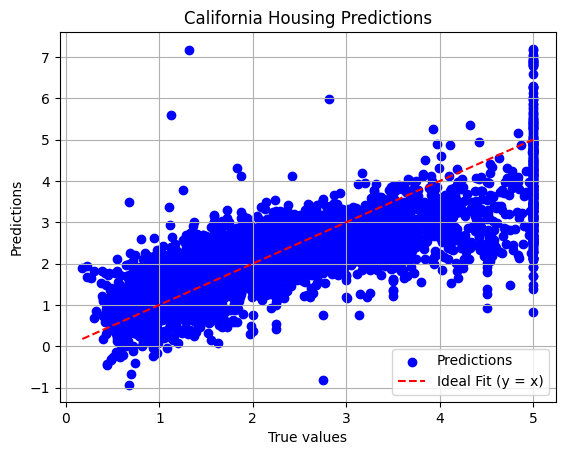
Our model is capturing the general trend of the data!
Summary Statistics
This is the great part of tidylinreg! Calling summary() will calculate important statistical values for the linear model coefficient estimates, including standard error, test statistic, confidence interval, and p-values. The output of summary() is generated by calling the following internal class methods:
get_std_error()get_test_statistic()get_ci()get_pvalues()
model.summary()
| Parameter | Estimate | Std. Error | T-Statistic | P-Value | |
|---|---|---|---|---|---|
| 0 | (Intercept) | -37.004147 | 0.790393 | -46.817373 | 0.000000e+00 |
| 1 | MedInc | 0.438382 | 0.005039 | 86.989990 | 0.000000e+00 |
| 2 | HouseAge | 0.009267 | 0.000535 | 17.314654 | 0.000000e+00 |
| 3 | AveRooms | -0.107089 | 0.006973 | -15.358336 | 0.000000e+00 |
| 4 | AveBedrms | 0.635964 | 0.033466 | 19.003273 | 0.000000e+00 |
| 5 | Population | -0.000007 | 0.000006 | -1.160798 | 2.457431e-01 |
| 6 | AveOccup | -0.003739 | 0.000536 | -6.981016 | 3.058442e-12 |
| 7 | Latitude | -0.422767 | 0.008629 | -48.992423 | 0.000000e+00 |
| 8 | Longitude | -0.435591 | 0.009039 | -48.191074 | 0.000000e+00 |
As stated before, the intercept estimate was included without any need for modifying the dataframe.
Interpretations
Wow, it looks like all of our coefficient estimates are statistically significant, except for Population (with a significance level alpha = 0.05). We can also make interpretations on these statistically significant coefficients; for example, we can say that a unit increase in median income in the block group (MedInc) is associated with an increase of $43,838.20 in the median house value for the housing district (holding all other factors constant).
Lets look at another less intuitive example: We can see the AveOccup parameter has a statistically significant estimate of -0.003739. We can say that increasing the average occupancy by one person is associated to a decrease of $373.90 in the median house value for the housing district, while holding other factors constant.